|
A FIRST
REASONING
In a modern studio, it's impossible to
work without MIDI te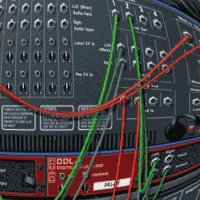 chnology.
A "midi-recorder" called sequencer
records and plays instructions for
instruments and other devices. This is how
you program rhythms into a drum computer,
for example. You play the sequencer, and the
sequencer "plays" the drum
machine. chnology.
A "midi-recorder" called sequencer
records and plays instructions for
instruments and other devices. This is how
you program rhythms into a drum computer,
for example. You play the sequencer, and the
sequencer "plays" the drum
machine.
There's basically two different parts of
Reason. There is the "Virtual
Studio" with all the
"hardware" you need to set up a
decent studio, and there's the Sequencer. In
the Sequencer, you program the riddim or
instrumental track that will be the
foundation of your final DUBWISE track. And
you'll record the moves on the mixing table
later on. So the Sequencer is the heart of
the set-up you create in the Studio section.
Before a riddim can be played or
programmed into the Sequencer, the Studio
has to be set up. This is always a very nice
thing to do. And in Reason, it's quite easy
too.
You start with an empty rack. Simply
"create" devices of any kind by
right-clicking on the rack and choosing from
a huge menu of devices. Pressing the
"tab" button will enable you to
flip from the front side of the devices to
the back. As you know, that's where the
cables go in. And that's where DUB producers
will do it different then most of their
colleagues.
Reason will automatically connect the
device according to a logic that will not
always be followed by everyone. For us, it's
nice to know that it doesn't have to be that
way. Holding the shift button down, while
right clicking on the rack will cause the
device to pop up without being connected to
other devices...
Several different kinds of devices are
necessary to make a decent studio. Of
course, there are the musical instruments.
Reason offers a number of different samplers
and synthesizers, as well as a drum
computer. Of course you can create multiple
devices of the same kind. The effects, more
important than the musical instruments, are
available in versatility too. Echo, Reverb,
Filter, Phaser, Distortion, and more. Reason
even has an additional number of
"luxurious" effects. And of
course, there is the mixing board. Or mixing
boards, to be exact.
 In
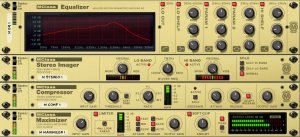
Reason 3.0, there's also a Mastering Section
that you can put between the master mixing
table and the output to your soundcard. But
for this first session, this isn't
important. For now, we want to know how easy
it is to set up the Studio for a DUB
session. Most programs look like they've
written for computer experts rather then
musical artists. Reason would have to be
different in order to remain on the lonely
heights that it currently is. In
Reason 3.0, there's also a Mastering Section
that you can put between the master mixing
table and the output to your soundcard. But
for this first session, this isn't
important. For now, we want to know how easy
it is to set up the Studio for a DUB
session. Most programs look like they've
written for computer experts rather then
musical artists. Reason would have to be
different in order to remain on the lonely
heights that it currently is.
To create a basic set up for a First
Reasoning takes about as long as it would in
"Real Life". Drum, Bass, Piano,
Guitar and Horns will do just nice. Reason's
14 channel Mixing Board has four effect
out-puts, so a slow and a fast echo will do
besides two different kinds of reverb. Some
other effects between the instruments and
the mixing board will complete the set-up.
Time to check the sounds and pre-sets.
It's easy to browse through the different
sections and finding a few satisfactory
sounds for the different instruments doesn't
take long. So this first look to the
soundbanks already reveal how there's a well
of sounds to be discovered at a later stage,
after we've done a first session. When
you're not too picky about the pre-sets and
know how to connect everything, this will
take you a few hours at the most. And during
this time, you're absolutely enjoying
yourself, realizing that you're only
scratching the surface of a very deep
ocean...
 Now
that a basic set-up is constructed, it's
time to create a little riddim. In Reggae
jargon, a riddim is a basic track. That
means, in Reggae Music, a bassline and a
short musical theme usually played by a horn
section or a keyboard. Time for some action
in the Sequencer! Now
that a basic set-up is constructed, it's
time to create a little riddim. In Reggae
jargon, a riddim is a basic track. That
means, in Reggae Music, a bassline and a
short musical theme usually played by a horn
section or a keyboard. Time for some action
in the Sequencer!
It's pretty easy to get to the Sequencer.
Just above the transport controls you can
open and close the screen at will. Or leave
it a little open, which will be of use in
the later stage, when we make a DUB.
The Sequencer has already recognized the
musical instruments and created a track for
it. It's easy to create new tracks, and
assign them to the mixing board and the
effect devices. There are several different
windows in the Sequencer: Key and Drum
"Lanes" where you can program the
riddim. Of course it's also possible to play
it using a midi keyboard, but since we want
to have a computer running Reason and see
what we can do, we're gonna program one.
Needless to say, that it's impossible to
say how long it takes before a riddim is
ready. Inspiration, experience, your own
archives, all these things are relevant in
this context. But with a little bit of all
of the above, it's pretty easy to create it.
Just take a listen to the following file.
It's a basic two-measure loop, with all the
instruments running and a little limiting at
the end. This is how it sounds before the
variations, breaks et cetera are programmed
in the Sequencer.
SOUND EXAMPLE 1: CLICK
HERE TO DOWNLOAD
This riddim is not finished, of course.
There have to be variations, themes, and
everything else. Only then can we start to
make a little DUB. For this first session,
it's not really that important to make the
best themes and most impressive drum rolls.
And it's not necessary to create a drum roll
at the start, either. This time, that is.
This is how the riddim sounds after a few
changes. This is what we're gonna transform
into a DUB.
SOUND EXAMPLE 2: CLICK
HERE TO DOWNLOAD
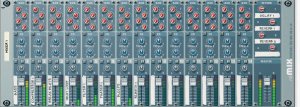
We're using 12 out of 14 channels from
the mixing table. The main output goes
through a limiter, which basically keeps the
signal from clipping. Take a look at the
following list:
1. BASSLINE - We've used a patch from the
"Subtractor" synthesizer, ran it
through an equalizer and a compressor.
Channel 1 on this mixing board also has an
extra Bass Boost in the EQ.
2. BASSDRUM - Straight from the "Redrum"
Drum Computer into this channel, with the EQ
similar to channel 1.
3. DRUMS - This channel contains the
complete drum sound minus the bassdrum. Dry,
with no EQ setting on the mixing table.
4. PIANO - Using the "NN-19 Digital
Sampler" for the Piano sound, then
through a phaser, into the mixing board.
5. GUITAR - Using a sound from the "NNXT"
Sampler, which goes through a filter before
it enters the Mixing Board.
6. HORNS - Using another "NNXT"
Sampler and another phaser, before the
signal enters Channel 6 on the console.
7. DRUMS FLANGED - Using FX output 1 from
the "Redrum" Drumcomputer, putting
it through the chorus/flanger. This channel
contains the snare and the toms
8. DRUMS PHASED - From FX output 2 of the
"Redrum" Drumcomputer, straight
into a phaser. This channel contains the hi
hat and the two crash cymbals, as well as
the tambourine.
9. EMPTY
10. EMPTY
11. EFFECT - From FX output 1 of the
Mixing table to the "RV 7000 Advanced
Reverb" using a digital reverb patch.
12. REVERB - From FX output 2 of the
Mixing Board to another "RV 7000
Advanced Reverb", using a spring reverb
patch
13. FAST ECHO - From FX output 3 of the
mixing board, straight into a Delay and back
again
14. SLOW ECHO - From FX output 4 of the
Mixing Board, straight into another Delay
and back again.
 This
set up is pretty basic. It has the most
crucial elements, but it just screams for
improvement. However, for a first session
it's Reason-Able. In the previous sound
example, we heard all of the above, except
for the slow echo. This
set up is pretty basic. It has the most
crucial elements, but it just screams for
improvement. However, for a first session
it's Reason-Able. In the previous sound
example, we heard all of the above, except
for the slow echo.
Time for some DUBBING! Remember, we've
not really taken the time to investigate the
fullness of the sounds, the effects and
everything else. We just created a basic set
up with the major effects. Some effects
stand between the instruments and the mixing
table, and there are two different echo's
and two different reverbs at our disposal.
In an interview with one of the Founding
Fathers of DUB, the mighty SCIENTIST, he
spoke about the "old days". He
spoke about visions he had from automated
mixing boards, which could enable him to mix
DUBS as if he had a lot of hands. That was
then a hope. That is now a thing, which
Reason enables every computer based DUB
producer to do. Again, the MIDI technology
is at the heart of this.
As we already established, the Sequencer
is where the riddim is stored. The Sequencer
drives the instruments. 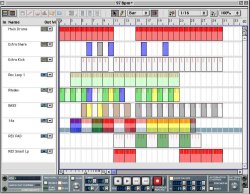 But it can also drive the mixing board and
the effects. In the very same way.
But it can also drive the mixing board and
the effects. In the very same way.
Whenever there's a button, a fader, a
slider, whatever, the moves you perform on
it during playback of the track can be
recorded into the Sequencer. When you then
press "rewind", or simply keep
playing the same loop, your recorded moves
will then be played by the Sequencer as
well.
Setting Reason up for the first DUB
session is easy too. Create a few sequencer
tracks and apply them to the devices you're
gonna use in the mix. When you get ideas for
other devices along the way, simply create
another sequencer track and continue your
production.
In the Sequencer window, there's two
buttons left of the track's names. One looks
like a little keyboard, the other simply is
the recording symbol: the Japanese flag, as
some would say.
In our set up, one of these tracks is
called "Mixing Board". Needless to
say where it's applied. When we press the
record button on the Sequencer track, and
also the record button on the transport
control at the bottom, the track starts to
play. And every move, every action we
perform on the mixing board will be
recorded. This is how the DUB is made in
REASON 3.0
Are you ready?
SOUND EXAMPLE 3: CLICK
HERE TO DOWNLOAD
The above DUB was created in about 20
minutes. It shows, what REASON 3.0 will
enable you to achieve, by using some
standard effects and instruments, nothing
fancy, nothing special, this is the basic
power of REASON 3.0
Just a few hours after the program is
installed on the Computer, our first
Reasoning has brought us something audible.
And this could never have been achieved with
some other "Virtual Studio's" or
even heavyweight sequencers such as Cubase.
Not without a significant amount of hardware
and/or expensive software plug-in's. And
even then, the way everything is connected
in this session isn't possible in other
programs either.
This is looking good. It will be a real
thrilling experience to explore the deeper
levels of Reason!
|