|
THE
MIXING BOARDS
Who says "DUB",
says "Re-Mix". Is it therefore a
coincidence, that Reason's Main Mixing Board
is called the reMIX? As with all devices in
Reason, it's possible to create several
Mixing Boards to create complex set-ups for
your DUB Studio. But for this review, we've
only created one.
Actually, there are two different mixing
boards in Reason 3.0, a novelty. There's an
auxiliary board too, which we, for now,
simply mention.
First we deal with the Main Board. The
reMIX VIRTUAL TEC MX 28-4-14.
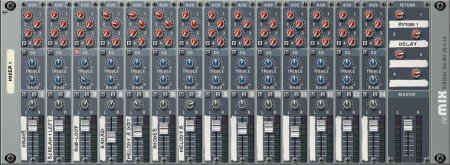
It's a 14 channel stereo board, with a
two band EQ per channel. There are no gain
buttons. Perhaps a tip for Reason 3.5? There
are four stereo FX outputs. One can be
assigned "pre "or
"post". When you select
"post", the output will work
independently from the fader at the bottom
of each channel. Oh yes, there are four
returns too. But in a DUB set-up, these
returns are of little use.
Take the typical DUB echo, for example.
Many think that a long echo in a DUB means,
that some pre-set is used with a long decay
of the echoes. However, this is one of the
biggest misunderstandings. In Reason, it's
easy to connect and set the Delay devices
according to that standard DUB setting.
 The
reMIX is a powerful board, especially
because it enables you to connect any device
in any way you want. Without being hindered
by standard procedures which so many
software developers program into their
software like the ten commandments:
unchangeable rules: take it or leave it. And
as you know, there isn't a single DUB
producer that doesn't break at least one of
the Ten Commandments of Music Production. The
reMIX is a powerful board, especially
because it enables you to connect any device
in any way you want. Without being hindered
by standard procedures which so many
software developers program into their
software like the ten commandments:
unchangeable rules: take it or leave it. And
as you know, there isn't a single DUB
producer that doesn't break at least one of
the Ten Commandments of Music Production.
The way we've connected our Delays in
Reason, is as follows: Aux output 1 goes to
the input of the Digital Delay, and the
output of the Delay goes into channel 11.
The Digital Delay is set to "Wet",
so that the original signal will not come
back at the mixing table, creating the
Doubler Effect so to speak. Also, feedback
is set to zero. So when a signal is sent to
the Digital Delay, the device will give the
delayed signal back to the mixing table.
Opening aux button 1 on channel 11 will
subsequently enable you to create echoes as
long as you like. It's easy to find the
right setting for Aux 1 on Channel 11, by
the way. Just play a bit with the slider and
the aux button until you found the right
balance. Putting the slide up will then give
you more echo, putting it down makes the
echo fade away just nicely.
Most programs won't let you do the above,
and yet it's the only way to connect the
Digital Delay. The mixing board, and what
you do on it, decides the sound of the echo.
Not the Digital Delay itself. Even with a
real Tape Echo it's done this way.
The Reason Mixing Board enables you to
create several layers of effects, as said
earlier in this review. The combinations are
endless, and with a little bit of smart
thinking you can easily develope many
special effects.
Reason also comes with some extra gadgets
to help you create a more complex set-up.
For example, when you want to use a lot of
different effects and you want to have the
possibility to create any combination at any
time during the mix, you must come up with a
smart set up.
Reason comes with a smaller mixing board
too, which will let you mix 6 different
channels, and has one auxiliary output and
return. A smart little toy that will enable
you to create a sub-mix in just a few
seconds.
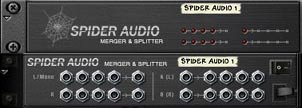 For
an even more primitive mixing board, Reason
has the "Spider Audio Merger And
Splitter", where you can simply make
one signal from several inputs or vice
versa. Possibilities enough. For
an even more primitive mixing board, Reason
has the "Spider Audio Merger And
Splitter", where you can simply make
one signal from several inputs or vice
versa. Possibilities enough.
The effects are High Quality, the Mixing
Board is good enough, and finally enables
the computer based DUB producer to create an
authentic DUB set up. When you know that you
can use samples to create the sound of your
instruments, you can imagine that Reason
will surely do the technical aspect for you.
It's a matter of talent, and development.
Skillful DUB doesn't come instantly, even
with Reason. Software that promises you
instant success or result, won't deliver.
Reason isn't that kind of software, and
still, because of its quality and
functionability, you will be working on your
first DUB in no time. And now that we've
established this, let's take a deep dive
into the Sounds and the Instruments that
play them.
|