|
THE
SOUND CREATORS
 In
a contemporary DUB studio, the sequencer
plays the music. And the sequencer itself
contains the instructions, the notes. This
is different then the average Recording
Studio, where the Sequencer is a Multi Track
Audio Recorder that records the sounds of
the instruments. In
a contemporary DUB studio, the sequencer
plays the music. And the sequencer itself
contains the instructions, the notes. This
is different then the average Recording
Studio, where the Sequencer is a Multi Track
Audio Recorder that records the sounds of
the instruments.
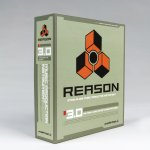
Talking about instruments, Reason has a
lot of them. And two CDR's packed with
sounds and presets to keep you going on for
a long time. But before we deal with the
sounds, let's take a closer look at the
devices that play the sounds.
* SubTractor Analog Synthesizer - A High
Quality Synth with too many control buttons
so that it is a little studio in itself
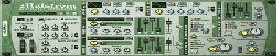
* Malstrom Graintable Synthesizer - This
device is a hybrid between a synthesizer and
an effect device, like the Vocoder.
*  NN19 Digital Sampler - The first sampler
came with Reason 1.0
NN19 Digital Sampler - The first sampler
came with Reason 1.0
* NN-XT Advanced Sampler - The follow-up
for the NN19, with a lot of programmable
parameters for fine-tuning and creation of
your own samples.
* Dr.REX Loop Player - This device is the
connection between midi and audio, as we
will see later. * Redrum Drum Computer -
With many interesting knobs, outputs and
functions, the Redrum is a little sampler in
itself where the drum functions are simply
outstanding.
* ReBirth Input Machine - When you're the
happy owner of the ReBirth package, with
this device you can synchronize the two
programs which basically mean you have two
monophonic synthesizers and two 80's style
Drumcomputers at your disposal, all of them
with a classic sound that is appreciated in
the Techno and Electro scenes.
Roughly spoken, you can divide them in
two main categories: The Synthesizer and the
Sampler. They both have a lot of specific
applications, but when it comes to sound
creation in general, the very same two
categories dominate the technique of Digital
Production.
A computer can generate sound from what
is called "synthesis". Basically,
without getting into boring technical
details too much, this means the computer
"reads" instructions and
translates it into something audible.
A computer can also generate sound from a
previous sound recording and can then
subsequently do something with that sound
recording. This technology is called
"Sampling".
Now there are many crossover elements in
Music Production. For example: when you
sample a synthesizer, you make use of both
technologies. But in order to get a
principal oversight on the Art of DUB, it's
necessary to know a few boring details such
as the above. We need it to know how to
treat the musical instruments in our Studio.
Reason primarily deals with the sampling
technologies. But there are two
Synthesizers: the Malstrom Graintable
Synthesizer, and the SubTractor Analog
Synthesizer. Let's deal with the SubTractor
first
The niceness of the synthesizer is that
it can create sounds through programming. A
Synthesizer can sound like a brass section,
for example. But it will always sound like a
brass patch of a synthesizer. Some people
hate it, and others simply love it. Many who
hate it, though, like the sound of the
Hammond Organ. And they forget how that also
is an instrument which uses electronics to
create it's sound, based on a "Real
Life" instrument!
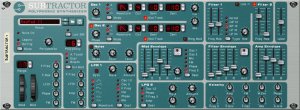 The
SubTractor is a High Quality synthesizer. It
can produce a bass sound that goes below
what any bass guitar can do. Especially when
you've found the right patch and combination
with EQ and compression. The organ patches
are wonderful, and with a little bit of
creativety you can easily create your own
sounds from scratch. The
SubTractor is a High Quality synthesizer. It
can produce a bass sound that goes below
what any bass guitar can do. Especially when
you've found the right patch and combination
with EQ and compression. The organ patches
are wonderful, and with a little bit of
creativety you can easily create your own
sounds from scratch.
The Malstrom Graintable Synthesizer is
different than the SubTractor. It's not just
an "Advanced SubTractor". Even
without knowing anything about Synthesis,
there are enough controller buttons on the
Synthesizer to create that special Techno-ish
sound that goes surprisingly well with a
simple Steppers Drums with tight bassline.
The Rebirth Input Machine can arguably
also be seen as a synthesizer. But because
this review is about Reason and we won't be
using Rebirth, it's simply mentioned here.
Suffice to say, that Rebirth makes in itself
use of the synthesis-technology.
Let's take a closer look at the two
samplers. The NN19 and its successor, the NN-XT
Advanced Sampler. The only difference
between the two is, that the NN-XT can do
everything the NN19 can do, plus extras.
These extras are manifold. It's possible,
for example, to read soundfonts. A soundfont
is a collection of samples with instructions
for samplers how to play the sounds. The
file format, (*.sf2) is open, and that means
you can find a lot of them on the Internet.
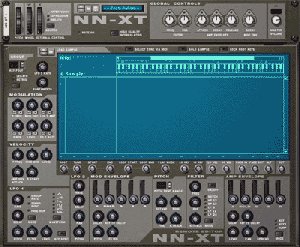 The
NN-XT contains two windows, where the NN19
only has one. The "Remote Editor"
screen of the NN-XT gives you the
possibility to control the Sampler to its
finest detail. It's just too bad, that you
can't record any of the functions in the
Remote Editor. It truly is. Because it would
have increased the functionability of the NN-XT
during DUB mixing session significantly. The
NN-XT contains two windows, where the NN19
only has one. The "Remote Editor"
screen of the NN-XT gives you the
possibility to control the Sampler to its
finest detail. It's just too bad, that you
can't record any of the functions in the
Remote Editor. It truly is. Because it would
have increased the functionability of the NN-XT
during DUB mixing session significantly.
For now, we can establish that both
Samplers do their work pretty good, actually
they both do it very well! The parameters on
both instruments give enough control too.
Then next sampling device is the Dr. REX
Loop Player. We haven't been using this
device yet, as we've only been using the
internal sounds of the Reason Studio and
made our own riddims.
Dr. REX can be your connection between
pre-recorded material created by another
Studio or Software program and Reason. But
you'll need another piece of software called
"ReCycle" to create the files that
can be read by the Dr. REX player.
Later, when we check the sound for the
different instruments, we'll take a closer
look at the loops that come with Reason, and
especially the "Dub" section will
have our full attention. For now, let's
establish that the Dr. REX Loop Player is
very interesting for the use of pre-recorded
material, whether they may be short Loops or
long parts.
And it should be mentioned here too, how
the DRUMDROPS.com DVD-ROMS (reviewed by
DUBROOM.com) are a very welcome source for
the dr. REX player.
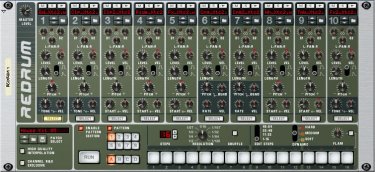 The
Re-Drum Drum Computer, as already
established, is a very simple yet powerful
Rhythm Machine. You can use up to ten
different channels, of which channels 8 and
9 can be selected as "exclusive",
which means you can use a closed hi-hat
sample on one channel, and open hi hat on
the other, for some nice patterns. Each
channel has it's own specific parameters,
which can be used for either fine-tuning or
special FX (Pitch Bend, etc). The machine
also has an internal pattern editor for
quick auditioning of sounds, or for another
use for which you don't need the
sequencer... The
Re-Drum Drum Computer, as already
established, is a very simple yet powerful
Rhythm Machine. You can use up to ten
different channels, of which channels 8 and
9 can be selected as "exclusive",
which means you can use a closed hi-hat
sample on one channel, and open hi hat on
the other, for some nice patterns. Each
channel has it's own specific parameters,
which can be used for either fine-tuning or
special FX (Pitch Bend, etc). The machine
also has an internal pattern editor for
quick auditioning of sounds, or for another
use for which you don't need the
sequencer...
The Sound Creators in Reason? They're
beyond the average quality of their hardware
equivalents. Especially when your goal is to
mix with effects in any possible way, the
samplers and synthesizers will do just nice,
thank you. Every device does exactly that
what it's supposed to do, and even more.
|